2 min readUpdated 7 August 2026
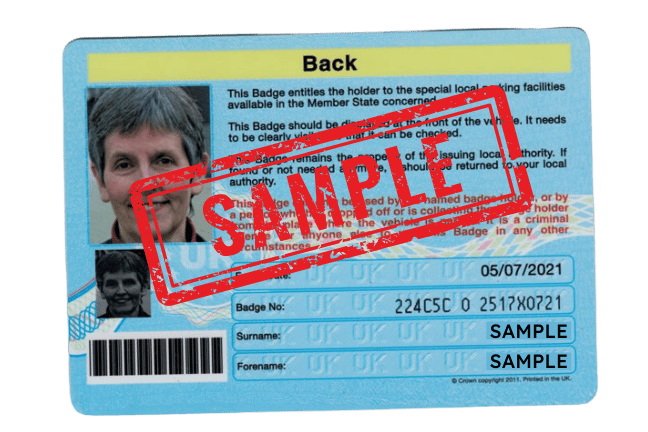
We need to see reverse side of your Blue Badge - the side with your photo on it. The photo needs to show all the details from edge to edge. Your card should be valid.
Step 1 - Take a photo of the reverse side of your Blue Badge
We need to see the reverse side of your Blue Badge that shows your photo, badge number, your full name and the expiry date.
If you upload a photo of the front side without these details it will fail our verification system.
Example image of the photo we require:
Step 2 - Review this checklist before you upload
Check your photo:
- shows the reverse side of your badge
- shows the entire badge, edge to edge
- has not expired - expired badges are rejected
- it taken out of its protective case, which causes glare and reflections
- has nothing else is in the photo - just the card as above example
Step 3 - Upload your photo
In most cases a Blue Badge photo taken correctly will be automatically approved.
You will automatically be taken to the payment screen to complete your Purpl membership subscription.
Tips on how to take a good photo
- Good light, and no flash - the flash reflects off the badge surface
- Badge flat on a surface, camera directly above it
- Check every line of text is legible before uploading
My Blue Badge upload failed, what shall I do next?
Please do not upload the same photo again - it will fail.
Check the checklist above and then retake.
All failed documents go through to manual review and we will contact you with the reasons why or if it was due to the lighting and we were able to approve it manually you will receive a Welcome email.
Related help
My document was rejected, what do I do next?
How long does verification take and how do I check the status?
How do I take and upload a document photo that Purpl can accept?
I am having difficulty uploading my document. What should I do?
Why am I being asking to verify again?
What happens to my verification data?